Reading Todoist Tasks with SAP Integration Suite
Most integration work in SAP is system to system. This walkthrough goes the other direction and connects SAP Integration Suite to an everyday cloud tool — Todoist — to read a task list over its REST API. The pattern itself is the point: an API token held in the tenant’s secure store, a Groovy script that reads that token and builds an Authorization header, and an HTTP receiver adapter that makes the call. Change the endpoint and the same three pieces will talk to almost any token-authenticated REST service.
This is the initial development — a timer-driven iFlow that authenticates and retrieves tasks. Parsing, mapping, and posting the result into SAP come later.
The Three Building Blocks
1. Issue the API Token
Generate a personal API token in Todoist under Settings → Integrations → Developer. This token authenticates every request and carries full read and write access to the account.
2. Store It Securely
Deploy the token to the Integration Suite tenant as a User Credentials security material artifact. The secret lives in the tenant’s secure store — never in the iFlow, never in source control.
3. Read and Call
A Groovy script retrieves the credential at runtime and sets the Authorization header. The HTTP receiver adapter then issues the GET request to the Todoist API.
Step 1 — Creating the Todoist API Token
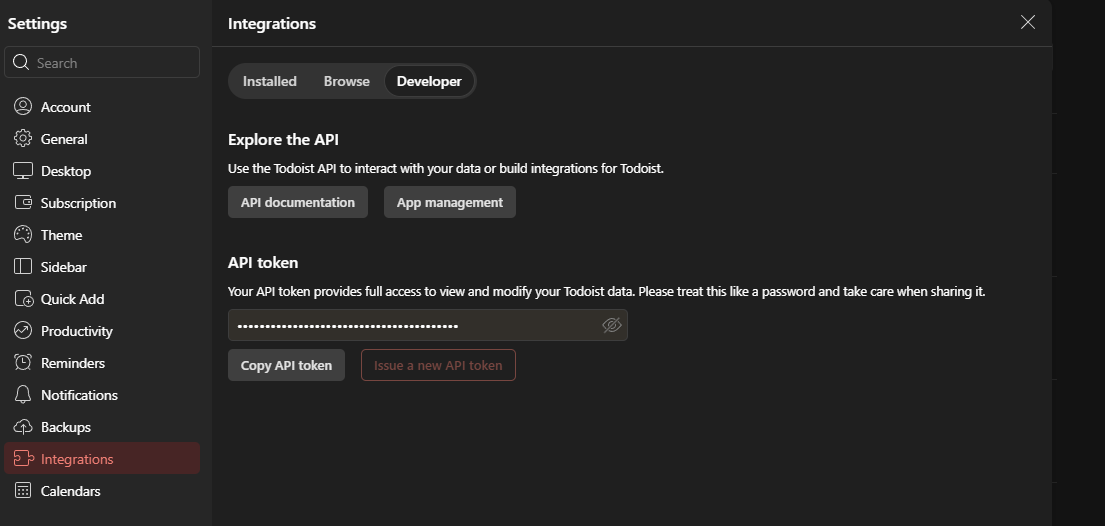
In Todoist, open Settings → Integrations and switch to the Developer tab. The API token shown there is a personal access token tied to the account. Copy it once and treat it exactly like a password — it grants full access to view and modify all Todoist data, and it does not expire on its own. If it is ever exposed, use Issue a new API token to invalidate the old one immediately.
Step 2 — Storing the Token as Security Material
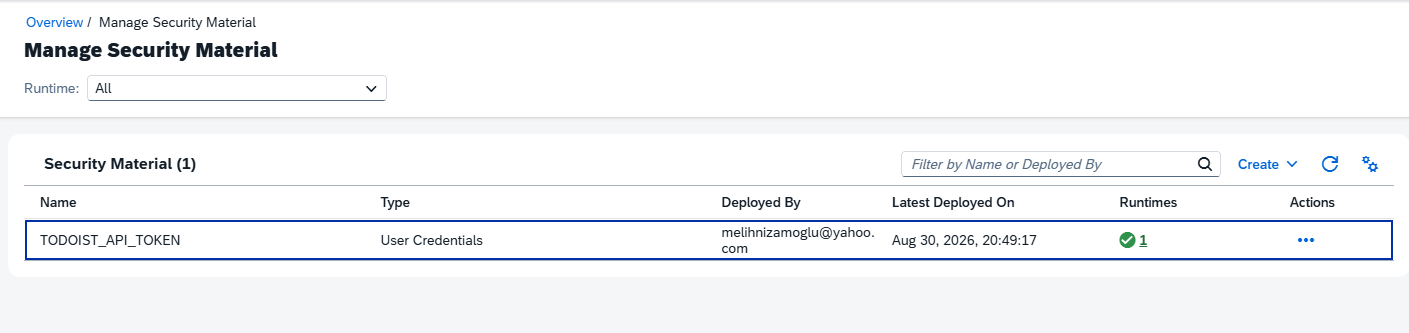
In the Integration Suite Monitor → Manage Security Material view, create an artifact of type User Credentials named TODOIST_API_TOKEN. The Todoist token goes in the password field; the user field is not used by the API and can hold any placeholder value.
Two details matter here. The artifact name is the key the Groovy script looks up, so it must match exactly — it is case sensitive. And the artifact must show a deployed runtime, as in the green indicator below; an artifact that exists but is not deployed to the runtime node will not be found at execution time.
Step 3 — The Integration Flow
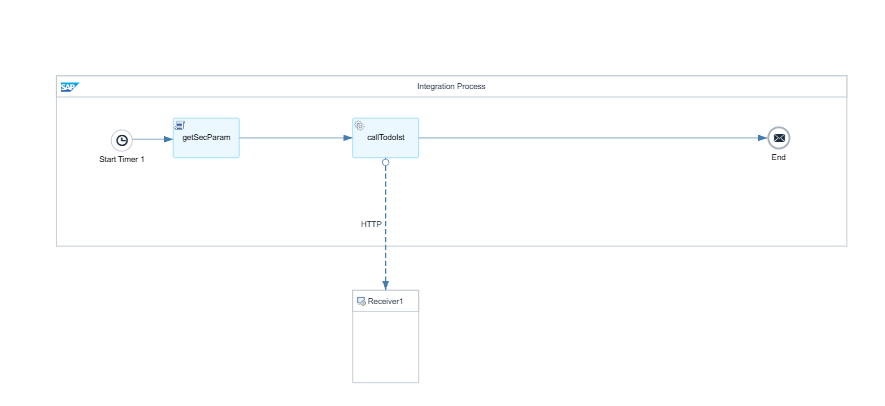
The iFlow is deliberately minimal. A Start Timer triggers the run on a schedule, a Groovy script step named getSecParam resolves the credential and builds the authorization header, and a Request Reply step named callTodoist sends the request to the Todoist receiver over HTTP.
The Groovy Script — Reading the Secure Parameter
The script uses ITApiFactory to obtain the SecureStoreService, looks up the deployed credential by name, and writes the token into an Authorization header using the Bearer scheme that the Todoist API expects. The null check is what turns a silent authentication failure into an explicit, readable error — without it, a missing or undeployed artifact surfaces later as a confusing 401 from the receiver.
import com.sap.gateway.ip.core.customdev.util.Message;
import com.sap.it.api.ITApiFactory
import com.sap.it.api.securestore.SecureStoreService
import com.sap.it.api.securestore.UserCredential

def Message processData(Message message) {
    def service = ITApiFactory.getApi(SecureStoreService.class, null)
    UserCredential credential = service.getUserCredential("TODOIST_API_TOKEN")

    if (credential == null) {
        throw new IllegalStateException("Credential 'TODOIST_API_TOKEN' not found or not deployed")
    }

    def apiKey = new String(credential.getPassword())
    message.setHeader("Authorization", "Bearer " + apiKey)

    return message
}
Note that only the password half of the User Credentials artifact is read. Todoist authenticates on the token alone, so the user field is ignored entirely.
Configuring the HTTP Receiver Adapter
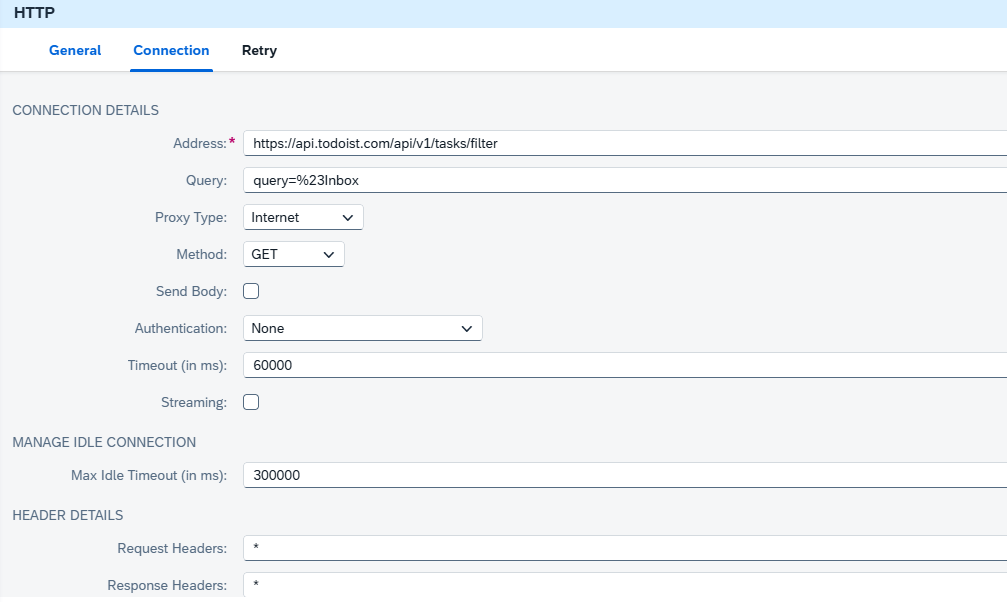
The receiver channel points at the Todoist tasks filter endpoint and issues a plain GET:
- Address:
https://api.todoist.com/api/v1/tasks/filter - Query:
query=%23Inbox— the%23is a URL-encoded#, so this reads as the Todoist filter#Inbox - Method: GET, with Send Body unchecked
- Proxy Type: Internet
- Authentication: None
- Request Headers:
*
The two settings worth pausing on are Authentication and Request Headers. Authentication is set to None not because the call is unauthenticated, but because the credential is already applied by the Groovy script — the adapter must not try to attach its own on top. And Request Headers has to allow the Authorization header through; the wildcard * does that. If that field is left empty, the adapter strips the header the script just set and the call comes back 401 Unauthorized. It is the most common reason this pattern fails on a first attempt.
Where This Goes Next
At this point the iFlow authenticates and returns the Inbox task list as JSON. The natural next steps are to convert that JSON to XML, map the fields that matter, and route the result somewhere useful — a custom SAP table, a work list, or a notification. Error handling deserves attention too: a retry policy on the receiver channel, plus an exception subprocess so a Todoist outage raises a monitored alert rather than a silently failed run.
The broader takeaway is that the secure store and Groovy header pattern shown here is not Todoist specific. Any REST service that authenticates with a bearer token — and most modern ones do — can be reached from Integration Suite with the same three building blocks.